 Loading... Please wait...
- Home
- Shop Products
-
Resources
- 3i compatible external hex abutment selection guide
- Bicon Compatible Abutment Selection Guide
- ZimVie TSX and TSV compatible abutment selection guide
- 3i certain compatible abutment selection guide
- Implant Locator Pin Guide
- Why Titan Implants
- The One Driver Advantage
- Signature Products
- Selection Guides
- Specialty Solutions
- FAQ
-
Educational Videos
- Company
- President's Statement
-
Contact Us
Shop Products
Implant Systems
Biomet 3i Compatible
Nobel Biocare Compatible
Zimmer Dental & ZimVie Compatible
ITI-Straumann Compatible
BioHorizons Compatible
Astra Tech Compatible
Bicon Compatible
Friadent Frialit and XiVE Compatible
STERI-OSS Compatible
Calcitek Compatible
Keystone (Lifecore) Dental Compatible
Core-Vent Compatible
Paragon Compatible
Centerpulse Compatible
IMZ Compatible
IMTEC Systems Compatible
BioLok Compatible
Innova-Corp Compatible
Impla-Med Sterngold Compatible
Osteo Implant Corporation Compatible
( ADI ) American Dental Implant Corp. Compatible
Swiss Implants, Inc. Compatible
The Spectra System Compatible
Shop by Component
Abutments & Attachments
- All abutments & attachments
- Straight Abutments
- Multi-Unit Abutments
- Multi-Unit Abutment Attachments (NB Interface)
- Conical Abutment Attachments
- Modifiable Preppable Abutments
- Titan Design Ex Hex Simple Step Abutments
- Temporary Abutments
- Titanium Bar Abutments for Laser Welding
- Overdenture Ball Abutments
- Non-Engaging Post Abutments One Piece
- Solid Abutments for Tissue Level Implants
Healing & Surgical
Impression & Lab Components
Accessories & Extras

- Home
- Accessories & Extras
- Titan Design Implant Locator Pin (Titan Exclusive)
Titan Design Implant Locator Pin (Titan Exclusive)
The Titan Implant Locator Pin — Complete Workflow Guide by Abutment Type
What is the Titan Implant Locator Pin?
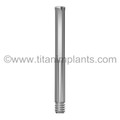
The Titan Implant Locator Pin is a straight, threaded stainless steel pin with a serrated finger handle — a Titan proprietary instrument designed to separate the "orient and seat" step from the "fasten and torque" step in every abutment and impression coping placement. It is autoclavable, reusable, and available in thread types matched to the most popular implant systems.
Available SKUs:
| SKU | Thread | Primary Compatible Systems |
|---|---|---|
| M1.6-ILP-22 | Metric M1.6 | Nobel Brånemark NP (3.3mm), Friadent/XiVE |
| M2-ILP-20 | Metric M2 | Various M2-thread implant systems |
| M2.5-ILP | Metric M2.5 | Various M2.5-thread implant systems — see titanimplants.com/implant-locator-pins/ for full list |
| 1-72-ILP-22 | 1-72 UNF | ZimVie / Zimmer Screw-Vent, TSV, TSX |
Full SKU list by implant system: titanimplants.com/titan-implants-locator-pins/
Why it was designed: Placing a small-diameter screw accurately into a deep posterior implant with restricted access and impaired visibility is one of the most error-prone moments in implant restorations. The Locator Pin replaces the screw for the seating step — it's larger, has a grippable handle, threads by hand without a driver, and holds any coping or abutment snugly via the precision-fit head. Once the component is oriented and seated, the pin is swapped for the titanium screw in seconds.
Locator Pin Use — Straight Locking Implant Abutment Flat
The Straight Locking Implant Abutment Flat is Titan's most widely used abutment — available for all major platforms, in cuff heights from 1.0mm to 5.5mm in ½mm increments (Titan exclusive), with a wide range of emergence profile diameters. Horizontal grooves assist in height measurement and significantly increase cement retention.
Chair-side with Locator Pin:
- Select the correct collar height, emergence profile, and prep height using the selection method in this FAQ.
- Thread the Locator Pin by hand into the implant — the serrated handle provides secure grip even in a restricted posterior arch.
- Slide the abutment down over the pin; the flat anti-rotation feature self-aligns.
- Confirm angulation visually — the pin handle projecting from the abutment gives an immediate axis reference.
- Remove the pin; seat and torque the abutment screw to spec.
Lab with Locator Pin:
- Insert the appropriate Locator Pin into the implant analog on the master cast to verify axis and confirm the selected abutment will seat correctly before fabricating the crown.
- Use the pin as a prep-height reference guide during height measurement with the horizontal grooves.
Minor angle correction: Per Titan's documented clinical guidance, inserting Locator Pins into multiple implants simultaneously allows visual confirmation that straight abutments are viable — and minor angular discrepancies can often be managed with straight abutments when the pin assessment confirms sufficient parallelism.
Locator Pin Use — Simple Step Abutment (Biomet 3i External Hex)
The Simple Step Abutment's defined three-dimensional geometry (collar height / emergence profile / prep height) means the right part selection before placement is everything. The Locator Pin is the validation tool that confirms the selection will work before you commit.
Before ordering — parallelism check:
- At the post-healing appointment, insert Locator Pins into each implant in the case.
- Assess parallelism — if the divergence is within the acceptable range for straight abutments, proceed with Simple Step selection; if not, plan for angular management.
Chair-side placement:
- Thread the Locator Pin into the implant.
- Slide the Simple Step Abutment over the pin — the external hex self-aligns.
- Confirm the collar depth is at the intended tissue level; if the collar emerges too high, reassess collar height selection.
- Remove the pin; seat and torque the abutment screw.
Locator Pin Use — Abutment Impression Coping (Straumann RN/WN, Friadent XiVE)
(See the dedicated Abutment Impression Coping section above for the full workflow.)
In summary: the Locator Pin workflow for abutment impression copings depends entirely on how the coping attaches to the implant. For copings with a central screw bore that seat directly into the implant (Friadent, IME/UMA, TG Hex types), the Locator Pin threads into the implant first and the coping slides over it — no driver needed, no dropped screws. For SynOcta-type copings that seat over an already cold-welded one-piece solid abutment, the Locator Pin is used only before the solid abutment is cold-welded: it threads into the solid abutment's top-surface receptacle to assess angulation. Once the solid abutment is seated, the implant connection is blocked and the Locator Pin cannot enter the implant from above.
Locator Pin Use — Bar Post Abutment
Bar post abutments are non-engaging cylindrical Grade 23 Ti-6Al-4V ELI posts that thread into the implant and are laser-welded to titanium bars to form all-titanium overdenture bar and bridge frameworks. Each bar post comes with a titanium screw.
The laser-welding technique eliminates casting, waxing, investing, and finishing — making it one of the most economical and accurate lab frameworks available.
Parallelism check with Locator Pins (critical for bar cases): Bar post implants require far more precise parallelism than single-crown cases — the bar itself cannot flex to compensate for divergent posts. Before any lab work:
- Insert Locator Pins into all implants in the bar case simultaneously.
- Assess parallelism visually and with a surveyor if needed.
- Determine whether any posts will need to be angled, or whether the bar design must compensate for divergence.
- Document pin positions for the lab with a photograph or impression — this is the reference the lab will use to set bar height.
Chair-side placement:
- Thread the Locator Pin into each implant by hand.
- Slide the bar post down over the pin; remove the pin and seat the titanium screw.
- For multi-implant bar cases, work systematically implant by implant — do not fully torque any post until all posts are hand-seated and alignment is confirmed.
Locator Pin Use — Multi-Unit Abutments
Multi-unit abutments (transmucosal screw-retained abutments for full-arch and bridge cases) require the highest parallelism accuracy of any abutment type. Even small angular discrepancies are magnified across a full arch.
Pre-treatment planning with Locator Pins: Insert Locator Pins into all implants before treatment planning begins. The pin array gives the most direct visual map of the implant axis distribution — identifying which implants will require angled multi-unit abutments, and what angulation is needed before the abutments are ordered.
Chair-side placement:
- Thread the Locator Pin into the implant; slide the multi-unit abutment over the pin to confirm it engages the internal connection correctly before threading the abutment screw.
- Torque multi-unit abutments to the manufacturer's specification for the implant system — typically 35Ncm for most platforms; confirm from the implant system's documentation.
← Browse compatible parts using the menu on the left under "Shop All Stores"
Titan Implants carries compatible restorative components for 20+ active and legacy implant systems — including discontinued brands. If you don't see your system, call us.
20+ systems Questions? Call us: 1-201-439-0470Current Top Sellers




|
Note: All pictures are not sized to scale. All prices are in USD. All prices and product availability subject to change without prior notice. Titan Implants® is a trademark of Titan Implants, Inc., | |||||
|
Branemark System®, MirusCone™ and EsthetiCone®, Sterioss®, Nobel Active®, and NobelReplace®, Tapered and Straight Groovy, Nobel Speedy®, Replace™, Replace Select™ Tapered and Straight, Sterioss™, HL Series, Flat Top, Replace™ External Hex, Unigrip, WP, and RP are registered trademarks of Nobel Biocare. 3i®, Biomet®, Biomet 3i™, Certain®, Miniplant®, NanoTite™, Osseotite®, Osseotite XP® and Prevail®, MicroMiniplant®, and Immediate Occlusal Loading® are trademarks of Biomet 3i, Inc. 3i TG® is a registered trademark of 3i Implant Innovations Inc. Frialit-2®, XIVE®, and Friadent® are registered trademarks of Dentsply Friadent Group. OTI Systems® is a registered trademark of Osteo- Implant Corporation. Micro-Lok® and Silhouette Laser-Lok® are registered trademarks of Bio-Lok International Inc. IMTEC®, Endure® and Universal® Implants are registered trademarks of Imtec 3M Corporation. Lifecore® is a registered trademark of Lifecore Biomedical Group. Lifecore®, RESTORE, SD, RD, WD, Renova®, SDI, WDI, Stage-1, RDS, and WDS are registered trademarks of Keystone Dental. Solid Abutment, SCS, and SynOcta® are registered trademarks of ITI-Straumann®. Screw-Vent®, Tapered Screw-Vent®, Spectra Cone®, Tapered Collar®, Advent®, Taper-Lock®, SwissPlus®, and Micro-Vent™, Bio-Vent®, Core-Vent®, Spectra Cone®,(The Spectra System®) are registered trademarks of Paragon Dental. Paragon®, Screw-Vent®, Tapered Screw-Vent®, Advent®, SwissPlus®, and Spline® Implants are registered trademarks of Zimmer Dental. One Stage®, and Endopore ® are registered trademarks of Innova Corporation. BioHorizons™ is a trademark of BioHorizons USA Implant Systems Inc. Sterioss, HL Series, Flat Top, Replace, Replace-Select, are registered trademarks of Nobel Biocare AB. IMZ® is a registered trademarks of FRIATEC systems. MicroThread™ and Conical Seal Design™ are registered trademarks of Astra-Tech Dental. Astra Tech Inc. is a registered trademark of DENTSPLY Implants. Bicon™ is a registered trademark of Bicon Dental Inc. INTEGRAL® and OMNILOC® are registered trademarks of Calcitek®. Spiralite® and Bonelock® Implants, Rootform® Flat Top Abutments and Hex-Top Abutments are registered trademarks of Swiss Implants Inc. Sterngold-ImplaMed® is a trademark of Sterngold Dental, LLC. American Dental Implant is a trademark of American Dental Implant Corporation. |
|||||
| Contact Us at : 1-201-439-0470 Or call us at : 201-439-0026 Customer service hours 8:30am - 5:00pm EST, Monday through Friday (Our clients are dentists and lab technicians. We do not work with patients.) |
|||||
We ship by  |
We Accept  |
| |||

Copyright 2026 Titan Implants, Inc. - All rights reserved.
